
Fixing Instant Search
Instant Search doesn't display any results at all, only displays results before a certain date or always shows that there are items left to index. I let it index overnight but nothing has changed.
How can I get it to completely index my messages?
 There are a couple of levels at which Instant Search in Outlook can break.
You can troubleshoot Instant Search in the mentioned order in this article.
Known issue?
 Unfortunately, there are regularly issues with the Search Index either on the Windows side or the Outlook side. Some of these bugs are relatively minor but on other occasions, it could prevent Outlook from showing any search results for certain configurations.
You can check for any currently known issues regarding Search and other Outlook features on this page: Fixes or workarounds for recent issues in Outlook for PC.
Marked for indexing
If the issue isn’t caused by any currently known issue, check whether Outlook has been marked to be indexed.
- File-> Options-> section: Search-> button: Indexing Options…-> button: Modify
Note that you can’t specify which mailboxes or pst-files in Outlook to index; You either index Outlook or you don’t.
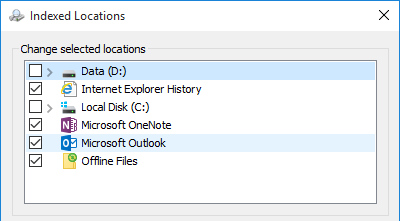
Outlook selected as an Indexed Location in Indexing Options.
Check for pst-file corruptions
 If Outlook is being indexed but the correct results are still not being returned, it usually means there is some corruption going on in your pst-file.
In order to fix these you should scan your pst-file for errors with scanpst.exe. You can find this file in the same folder as outlook.exe or use OutlookTools (free!) to locate it for you.
Once repaired, open Outlook and leave it idle for some time. To see if everything has been indexed now use:
- Simplified Ribbon (Microsoft 365)
Click in the Search field in order to make the Search Tools tab visible in the Ribbon. Here click on the ellipsis menu (3 dots) on the right and choose; Search Tools-> Indexing Status… - Classic Ribbon
Click in the Search field in order to make the Search Tools tab visible in the Ribbon. Here click the Search Tools button and select the Indexing Status…
When you have a big pst-file or mailbox, this indexing could take some time but if the number of items left to index doesn't change after leaving your computer idle for over 30 minutes, something is wrong still.
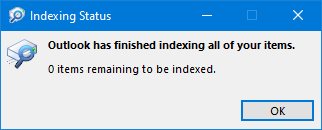
Indexing Status of Outlook.
Disable and then re-enable Outlook for indexing
To force Outlook to re-index its data, use the following procedure;
- Go back to the Search Options and deselect Outlook.
- Close Outlook and wait for about 5 minutes and also verify in Task Manager (CTRL+SHIFT+ESC) that on the Processes tab the outlook.exe process actually quits.
- You might get a lot of disk activity; this is the Search Indexer removing the indexed items from the Index.
- Open Outlook again and go back to the Search Options and reselect Outlook.
- Leave the computer idle again and see if it will eventually reach the status of “0 items remaining.”
Rebuild the index
If Outlook still can’t complete indexing, it might be that the Index itself has been damaged.
You can rebuild the index via the Advanced Search Indexer Settings dialog;
- Open the Indexing Options dialog.
- Start-> type; Indexing Options
- Windows 10
Start-> Settings-> Search-> in the left pane select; Searching Windows-> at the bottom click the text link; Advanced Search Indexer Settings - Windows 11
Start-> Settings-> Privacy & security-> at the bottom, click; Advanced indexing options - Control Panel-> Indexing Options
(Type “Indexing” in the Search field of Control Panel to quickly locate the applet.)
- Click on the button Advanced.
- Click on the button Rebuild.
This will rebuild the entire Index from scratch and, depending on the amount of documents to be indexed, this could take quite long and degrade your system's performance while the Indexer is still busy. I would recommend to have it rebuild itself overnight.
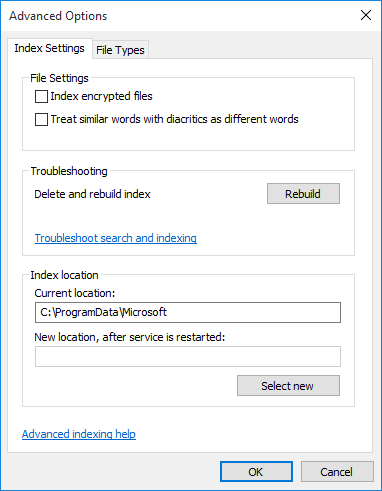
Advanced Indexing Options allows you to Rebuild the Search Index.
Troubleshoot email search results
If it still doesn't work press the blue “Troubleshoot search and indexing” link in the main Indexing Options dialog.
This will start a troubleshooting wizard in which you can select the option “Outlook search doesn’t return results”.
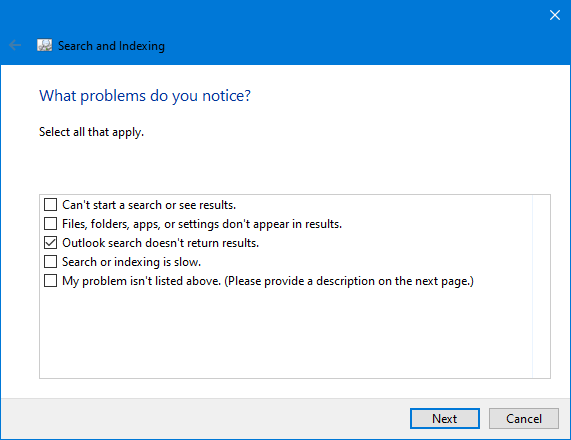
Troubleshooting wizard for Search and Indexing.
Check Event Viewer and post in the Outlook forum
 Still running into indexing issues?
It might be good to take a look in the Event Viewer and look for any errors logged by the “Search” or “Microsoft Outlook”.
If the error logged there is not helpful to you, post it in the Outlook forums together with your configuration details in order to help you troubleshoot it.
