
Save Sent Items in owner’s mailbox
When I sent a message on behalf of someone via Exchange, that message is placed in my Sent Items folder and not in the Sent Items folder of the second mailbox.
How can I configure this?
 There are several methods to configure that items which are send from a shared or delegated mailbox will be stored in that mailbox or in your own.
Which method to use depends on your preference but some also require the assistance of your Exchange administrator.
Outlook Method 1: DelegateSentItemsStyle Registry key
 A quick way to change the behavior of where the Sent Items are stored for delegated mailboxes is by adding the
 DelegateSentItemsStyle value in your Registry;
Key location for Outlook 2016 / 2019 / 2021 / 365: HKEY_CURRENT_USER\Software\Microsoft\Office\16.0\Outlook\Preferences
Key location for Outlook 2013: HKEY_CURRENT_USER\Software\Microsoft\Office\15.0\Outlook\Preferences
Key location for Outlook 2010: HKEY_CURRENT_USER\Software\Microsoft\Office\14.0\Outlook\Preferences
Value name: DelegateSentItemsStyle
Value Type: REG_DWORD
Value: 1
When the value is set to 0 or the value name is missing, the Sent Items will be stored in your own Sent Items folder.
Note 1: Make sure you have added the additional mailbox to your mail profile and that you have at least Reviewer permissions on the mailbox level and Author permissions on the Sent Items folder. See this guide on how to do that.
Note 2: If you also want the Deleted Items to stay in the mailbox of the delegate, see this post.
Note 3: This Registry key must be removed when using any of the Exchange level solutions.
Outlook Method 2: Additional account
 Another quick method is to add the shared or delegated mailboxes as an additional Exchange account.
However, this requires you to have full mailbox access rights for the additional mailbox (this has to be set by your Exchange administrator).
You can then select it as a sending account and will be sending the message “as” that mailbox instead of “on behalf of” that mailbox.
This method also has additional benefits such as auto account selection, getting new mail alerts for this mailbox, being able to set message rules and to turn Automatic Replies (OOF) option on and off.
For the exact procedure to add a mailbox as an additional Exchange account see:
Adding an additional or shared mailbox from the same Exchange organization to Outlook
By default Outlook allows up to 10 Exchange accounts in a single profile but this can be extended.
Outlook Method 3: Add-ins
 Aside from doing this via one of the methods above, there are also several add-ins available to control the behavior of Sent Items.
These add-in often have additional features that could make managing Delegated Mailboxes, Shared Mailboxes and/or Sent Items more convenient.
For instance UniSent by IvaSoft or Timed Email Organizer by Sperry Software (discount code: BH93RF24 ). Additional tools can be found here as well.
Exchange Method 1: PowerShell
 Instead of configuring this on a client, an Exchange administrator can also control the behavior of the Sent Items for Shared and Delegated mailboxes via PowerShell.
For message Sent As a mailbox;Set-Mailbox <mailbox name> –MessageCopyForSentAsEnabled $true
For messages Sent on Behalf of a mailbox;Set-Mailbox <mailbox name> –MessageCopyForSendOnBehalfEnabled $true
Note: For the server-side method to work, the client-side method with the DelegateSentItemsStyle Registry key must be removed.
Exchange Method 2: Microsoft 365 Admin Center
 When the mailbox is hosted in Exchange Online, the setting above can also be set within the Microsoft 365 Admin Center without using PowerShell.
However, this only applies to Shared Mailboxes and not delegated user mailboxes.
- Login to the Microsoft 365 Admin Center.
- In the Navigation Pane on the left, expand “Teams & groups” and select: Shared mailboxes.
- Select the shared mailbox for which you want to set the Sent Items behavior.
- In the Settings Panel that opens, click on “Edit” in the Sent items section.
- Select the available options as needed;
- Copy items sent as this mailbox
- Copy items sent on behalf of this mailbox
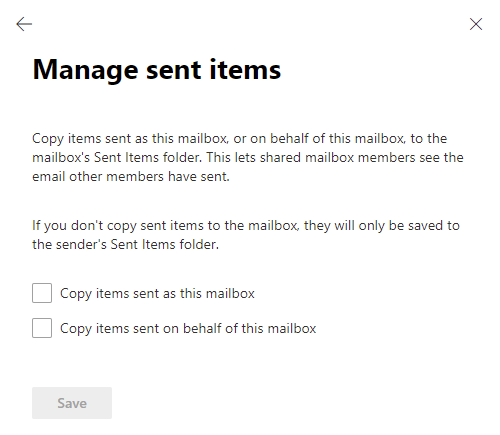
Managing Sent Items for Shared Mailboxes within the Microsoft 365 Admin Center.
Exchange 2010 Method 1: Sent Items Options in OWA
 When you are (still) connecting to an Exchange server running Exchange 2010 SP2 RU4 or later (click here to find out) but not Exchange 2013 or later, then you can set the behavior for where Sent Items when sending with “Sent As” or “Send on behalf of” permissions should be stored via Outlook Web App. This will also affect Outlook’s behavior.
- Click on the Options button in the top right corner.
- Choose: See All Options…
- Choose: Settings
- Select the “Sent Items” tab.
- Set your Sent Items options for where to store emails which you sent with the “Sent As” or “Sent on behalf of“ permissions. You can choose between:
- From Mailbox
- Sender and From mailboxes
- Sender Mailbox
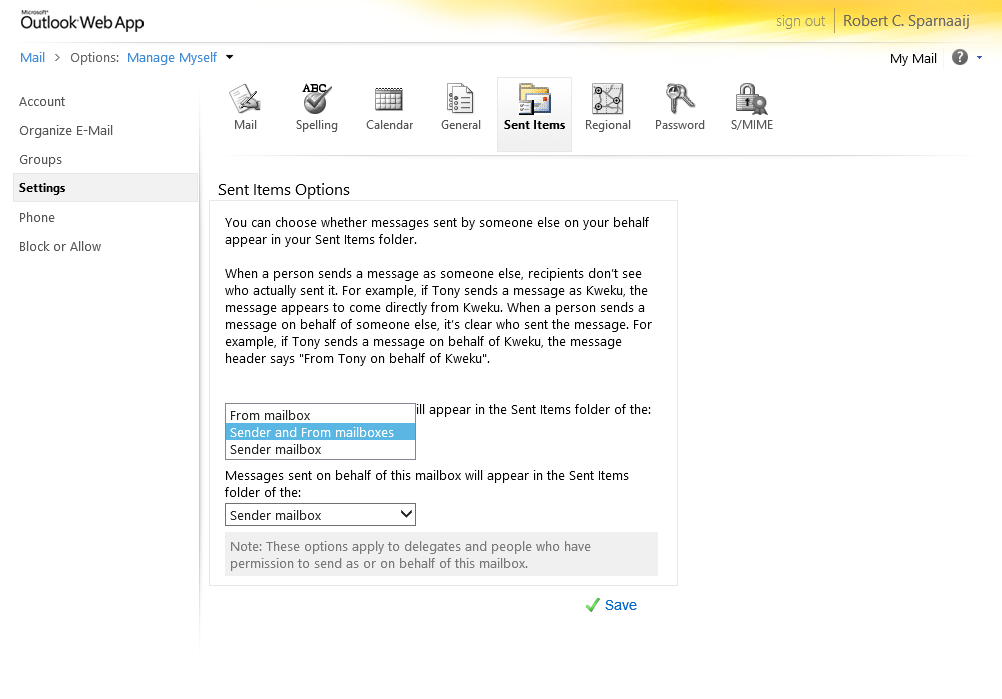
You can set where Sent Items when sending as a delegate should be stored in OWA (click on image to see the full options dialog).
Exchange 2010 Method 2: PowerShell
 An Exchange administrator can also control this setting with the following PowerShell commands for Exchange 2010.
For message Sent As a mailbox;Set-MailboxSentItemsConfiguration <mailbox name> –SendAsItemsCopiedTo SenderAndFrom
For messages Sent on Behalf of a mailbox;Set-MailboxSentItemsConfiguration <mailbox name> –SendOnBehalfOfItemsCopiedTo SenderAndFrom
Note: For the server-side method to work, the client-side method with the DelegateSentItemsStyle Registry key must be removed.
