
Associate Notes with Contacts
Is there a way to associate Notes with specific contacts so I can track these Notes on the "Activities" tab of the contact as well?
Yes you can. Even though when you open a note it looks deprived of options at first, there is actually a menu hiding under the icon in the top-left of the note. When you select the Contacts… menu item, a dialog opens where you can type a name or browse for a contact. You can enter multiple names is you like.
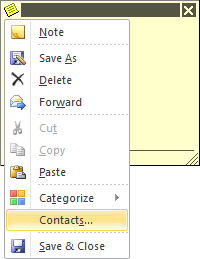
Under the Note icon you can find a menu…
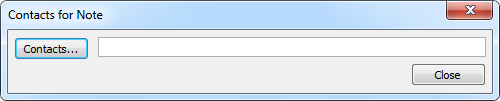
…which includes a Contacts for Note option.
Note: In Outlook 2007, Outlook 2010 and Outlook 2013, “Contact Linking” is hidden by default but can be enabled again on other forms such as other Contacts and Appointments.
