
Increase maximum size for pst-files and ost-files
I heard that the default size for pst-files and ost-files is 50 GB but also that there must be a Registry value that allows to increase the maximum up to approximately 4PB (4096TB).
How do I increase the maximum file size of an UNICODE pst file?
 In Outlook 2003 and Outlook 2007, the maximum recommended size of a Unicode pst-file and ost-file has been limited to 20GB.
In Outlook 2010, 2013, 2016, 2019, 2021 and Microsoft 365, this recommended limit has been set to 50GB.
You can increase (but also decrease) this limit via the Registry or via Group Policies.
Note: This tip does not apply to pst-files and ost-files which are in the Outlook 97-2002 format (ANSI formatted pst-files).
Via the Registry
 To increase the maximum size of pst-files and ost-files in Outlook, you’ll need to create and set 2 values in the following location in the Registry;
- Outlook 2003
HKEY_CURRENT_USER\Software\Microsoft\Office\11.0\Outlook\PST - Outlook 2007
HKEY_CURRENT_USER\Software\Microsoft\Office\12.0\Outlook\PST - Outlook 2010
HKEY_CURRENT_USER\Software\Microsoft\Office\14.0\Outlook\PST - Outlook 2013
HKEY_CURRENT_USER\Software\Microsoft\Office\15.0\Outlook\PST - Outlook 2016 / Outlook 2019 / Outlook 2021 / Microsoft 365
HKEY_CURRENT_USER\Software\Microsoft\Office\16.0\Outlook\PST
The following 2 new DWORD values must be created or set;
WarnLargeFileSize
Don’t set this higher than4090445042(decimal) orf3cf3cf2(hexadecimal)MaxLargeFileSize
Don’t set this higher than4294967295(decimal) orffffffff(hexadecimal)
The first value is how many MB a user can write to a pst-file or ost-file before receiving a warning that the file is full. The second value is how many MB the system can write to a pst-file or ost-file. This difference has to be at least 5% since there is more written to a pst-file and ost-file than just user data.
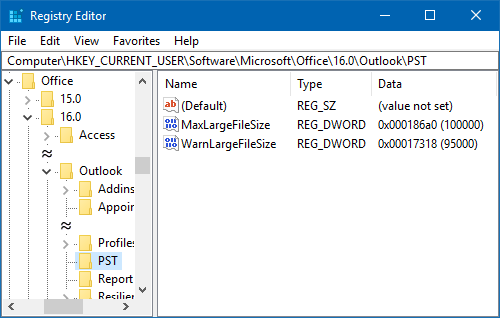
In this example the maximum size of pst-files and ost-files has been set to 100GB with a warning at 95GB.
Note: Although the Registry path says “PST”, it also applies to ost-files.
Via Group Policies
 If you are a corporate administrator and want to adjust the maximum allowed sizes of pst-files and ost-files, then you can use Group Policies as well. For detailed instructions on how to use and deploy Group Policies see this guide.
The settings for adjusting the maximum file size for pst-files and ost-files can be found in the section;
- User Configuration-> Administrative Templates-> Microsoft Outlook <version>-> Miscellaneous-> PST Settings.
The following 2 settings need to be modified;
- Large PST: Absolute maximum size
Don’t set this higher than4294967295 - Large PST: Size to disable adding new content
Don’t set this higher than4090445042
