
Cannot disable add-in
I'm trying to disable some add-ins but I get the error;
"The connected state of Office Add-Ins registered in HKEY_LOCAL_MACHINE cannot be changed."
How can I disable the add-in without uninstalling it?
 This error comes up when you try to disable an add-in which is registered at machine level rather than at user level.
To disable the add-in, you must start Outlook with administrator privileges.
Windows 7
Hold the SHIFT button and right click on the Outlook shortcut. From the menu choose "Run as administrator". Then press Continue or provide administrator credentials when prompted. Once you've made the change, restart Outlook to run it under the user context again.
Windows 8.1
In Windows 8.1, you can simply right click the Outlook icon in the Start Screen and choose “Run as administrator” from the menu that opens.
Windows 10
Right click on the Outlook shortcut in the Start Menu and from the “More” submenu choose: Run as administrator.
When you’ve pinned Outlook to the Task Bar, you can also right click on that and in the context menu that opens, right click on the Outlook icon again to see the option: Run as administrator.
Note: See this Q&A for instructions on how to enable/disable add-ins.
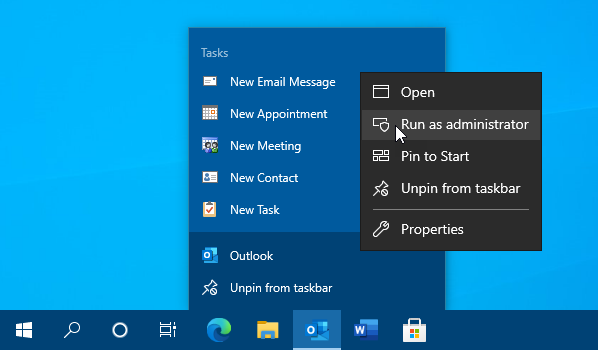
Some add-ins can only be disabled when you explicitly start Outlook as an Administrator.
