
Training Outlook’s Junk E-mail Filter
I'm getting the same spam message over and over again even though I mark it as Junk each time. I expected that Outlook would delete these messages automatically after I deleted a couple of them.
How can I train the Junk E-mail Filter in Outlook?
 Outlook’s Junk E-mail Filter doesn’t learn from you marking messages as Junk or by moving them into the Junk E-mail folder.
Outlook’s Junk E-mail Filter definitions are created by Microsoft and updated via Microsoft Update on an almost monthly basis.
Update: Microsoft has stopped providing updates to Outlook’s Junk E-mail Filter. Office 365 for Business and Outlook.com users are already behind a more modern filtering system known as Exchange Online Protection (EOP). Other large email providers like Gmail and iCloud also rely more on their server-side filtering rather than client side-filtering like in Outlook. The Safe and Blocked Senders lists and the International Filter will continue to function as before. For more info see; No more Junk E-mail Filter updates for Outlook and Exchange.
Junk E-mail Reporting Tool
 Most of the Junk E-mail Filter algorithm is based on the billions of spam messages that are received by the Outlook.com/Hotmail servers and that pass through Exchange Online Protection (part of Office 365 for Business) every day.
By continuously training the filter with this stream of messages, it is being improved and updated to fight the latest junk e-mail trends while also making sure that legitimate emails aren’t marked as junk.
If you also want to submit your Junk E-mail messages, so they can also be included in improving the filter, you can use the Junk E-mail Reporting Tool add-in from Microsoft.
This add-in integrates with the Junk E-mail feature of Outlook 2003, 2007, 2010, 2013 and 2016 and adds a button to quickly submit a message.
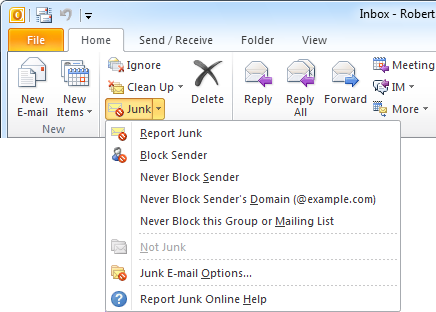
With the Junk E-mail Reporting Tool you can report a message with 1 click.
Note 1: Submitting messages isn’t a guarantee that it will be caught by the next Junk E-mail Filter update.
Note 2: If a lot of Junk E-mail is getting through, you can increase the filtering level and also verify that you haven’t added your own address to the Safe Recipients list.
