
Flagged a message for Follow Up but I’m not getting a reminder
I've flagged several messages for Follow Up but unless I also specify a reminder time myself, I do not get any reminder at all. When using the Today, Tomorrow, This Week or Next Week flags, the item does not show a "bell" icon either.
How can I automatically set reminders on flagged items?
 By default, flagged messages and other Outlook items will indeed not sound a reminder when none is explicitly set. This includes the Quick Flags for Today, Tomorrow, This Week and Next Week.
Luckily, it is quite easy to automatically add reminders for these Follow Up flags as well so you can save yourself the extra step of using the “Add Reminder” or the “Custom” command.
Set reminders on tasks with due dates
Flagged messages are basically being treated as Tasks when it comes to reminders. The “for follow up” date of a flagged message is in this case being treated the same as the “due date” of a task.
The option to automatically add a reminder when flagging a message can therefor be found in the Task options;
- File-> section Options-> section Tasks-> option: Set reminders on tasks with due dates
From now on, any message that you flag for follow up will automatically get a reminder set as well.
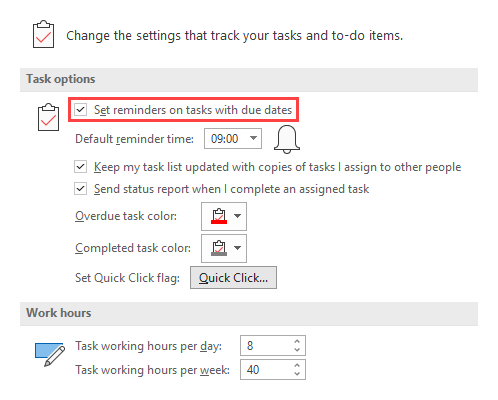
You can make sure that you get a reminder for each Task or flagged message by setting a default reminder time and enabling the option: Set reminders on tasks with due dates.
Default reminder time
The reminder time that will be set is your default reminder time which you can configure in;
- File-> section Options-> section Tasks-> option: Default reminder time
Behavior of items flagged for Today
 There is a little “gotcha” for when flagging items with the “Today” flag though;
- When you use this flag before your default reminder time, then a reminder is added.
- If you flag this item after your default reminder time, then no reminder is added and you’ll have to set the reminder manually.
Example with the default reminder time set at 9:00 AM;
- When you flag the item for Today at 8:30 AM, then you’ll get a reminder at 9:00 AM.
- When you flag the item for Today at 9:30 AM, then you’ll get no reminder.
