
Send button inactive for attached Draft messages
A colleague has sent me some draft emails as attachments to a message. When I open the attachments to revise the emails before sending, the send button is unavailable as it is greyed out.
How can I send these drafts without needing to copy them into a new message?
 To send an attached Draft messages, you’ll first need to save this item into your own Drafts folder. This is because attachments which are opened directly from within Outlook are opened as Read Only.
Drag & drop works best to achieve this easily; select the attachment in the Reading Pane and click and hold the mouse button to drop it into the Drafts folder.
When you now open the item from the Drafts folder, the Send button is active so you can send the message.
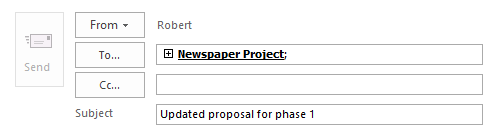
You cannot directly send an attached draft message; move it to your Drafts folder first.
Forward the opened draft attachment
If you need to do this on a regular basis, another approach would be to add the Forward button to the Quick Access Toolbar of the message composing screen.
When you then open the Draft attachment, pressing the Forward button will automatically create a sendable copy of the Draft (without a FW: prefix to the subject or a message header).
- Click on the down arrow on the right side of the Quick Access Toolbar and choose: More Commands…
Another way to go would be to to choose: File-> Options-> Quick Access Toolbar. - From the “Popular Commands” list, select: Forward
- Press the “Add >>” button.
- Click OK to return to the opened draft.
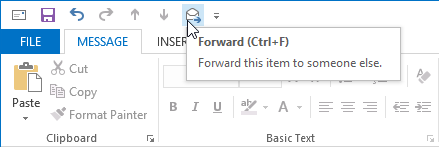
Forwarding an attached draft message will create a sendable copy.
Note: The suggested Ctrl+F keyboard shortcut in the ToolTip doesn’t work while composing a message. Instead, this will open the “Find and Replace” dialog. You can however press the ALT key on your keyboard and the number that will show for the icon. So in the example above, ALT+6 would initiate a Forward action as well.
