
Am I in ANSI or UNICODE format?
How can I see if my pst-file is in ANSI format or in UNICODE format?
UNICODE format is the new pst-file format used in Outlook 2003, Outlook 2007, Outlook 2010 and Outlook 2013. Previous versions of Outlook were using ANSI format.
For backwards compatibility reasons, Outlook 2003, Outlook 2007, Outlook 2010 and Outlook 2013 also support the ANSI format.
Determining the format
To see whether your pst-file is in ANSI or UNICODE format you can do the following;
- Open the Data File Management dialog;
- Outlook 2003 and Outlook 2007
Choose File-> Data File Management… - Outlook 2010 and Outlook 2013
File-> Info-> Account Settings-> Account Settings…-> tab Data Files
- Outlook 2003 and Outlook 2007
- Double click on the pst-file you want to check.
- Look at the "Format:" field;
- If it says “Personal Folders File” or “Outlook Data File”, it means that you are in UNICODE format.
- If it says “Personal Folders File (97 - 2002)” or “Outlook Data File (97-2002)”, it means you are in ANSI format.
Benefits of UNICODE formatted pst-files (conversion recommended)
Although the format change to UNICODE is mainly for international character support, the big end-user benefit is that your pst-files can now grow as large as 20GB and even larger. Also considering that all new Outlook developments regarding storage are based on this new format, converting your active pst-file(s) to the new format is highly recommended. For step-by-step instructions on how to convert see; Migrate from ANSI to UNICODE
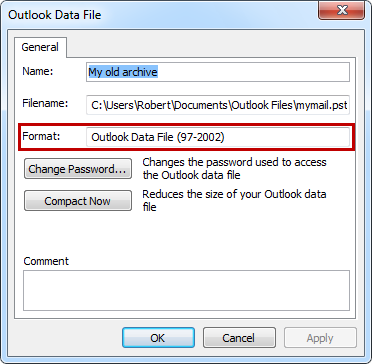
This pst-file is still in the old ANSI format.
