
Enable/Disable add-ins
Where in Outlook can I disable addins?
 You can enable/disable add-ins in the following way;
Outlook 2007
- Tools-> Trust Center…-> Add-ins.
- At the “Manage” dropdown list at the bottom select which type of add-ins you would like to enable/disable.
- Press “Go…” and make the changes.
- For some add-ins you'll need to restart Outlook for changes to take effect.
Outlook 2010, 2013, 2016, 2019 and Microsoft 365
- File-> Options-> section Add-ins.
- At the “Manage” dropdown list at the bottom select which type of add-ins you would like to enable/disable.
- Press “Go…” and make the changes.
- For some add-ins you'll need to restart Outlook for changes to take effect.
Note 1: See this post if you get the error “The connected state of Office Add-Ins registered in HKEY_LOCAL_MACHINE cannot be changed.”.
Note 2: You certainly do not need to have all add-ins enabled for Outlook to work properly. Disabling unneeded add-ins can actually speed up Outlook as well. For an overview see: Which Outlook add-ins do I really need?
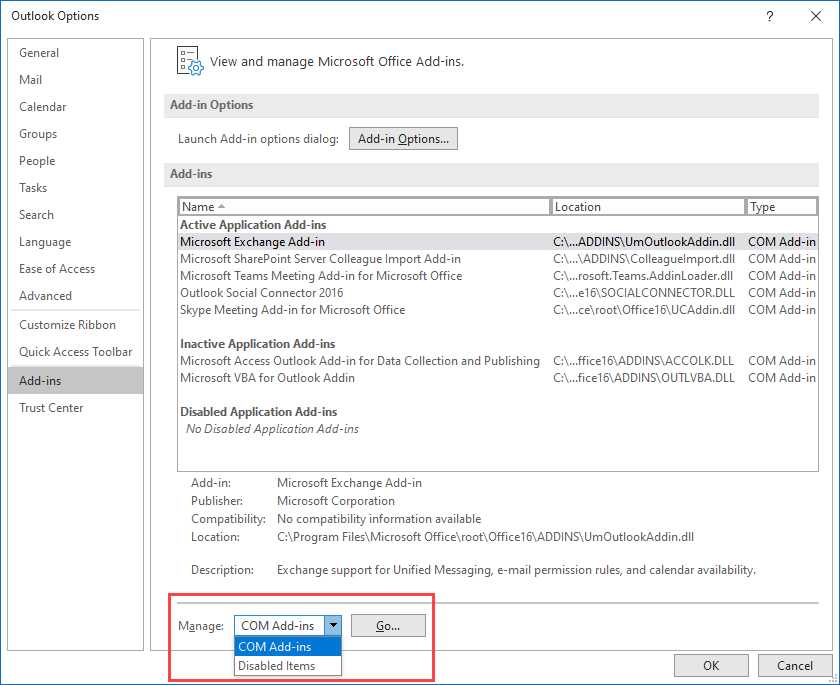
Managing add-ins in Outlook.
