Recreating the Birthday Calendar
Apparently, somehow at some point I've deleted the Birthday Calendar from Outlook.
How do I get it back?
 Actually, Outlook itself doesn't have a Birthday Calendar as birthdays are automatically placed in your main Calendar when you enter this information for a contact.
However, when you are using a Microsoft 365 Exchange Online, Outlook.com or Exchange 2016/2019 account, then you can indeed have an additional Birthday Calendar since web versions of Outlook don't place birthdays for contacts in the main Calendar folder but in a separate Birthday Calendar folder.
While getting rid of this calendar is as easy as selecting it in Outlook and pressing Delete, recreating it is a bit harder, but not by much.
Outlook.com and Microsoft 365 Exchange Online
 Logon to Outlook on the Web for Microsoft 365 Exchange Online or Outlook.com.
Once logged in press the “gear” icon in the top right corner to open the Settings pane and click on the “View all Outlook settings” link on the bottom.
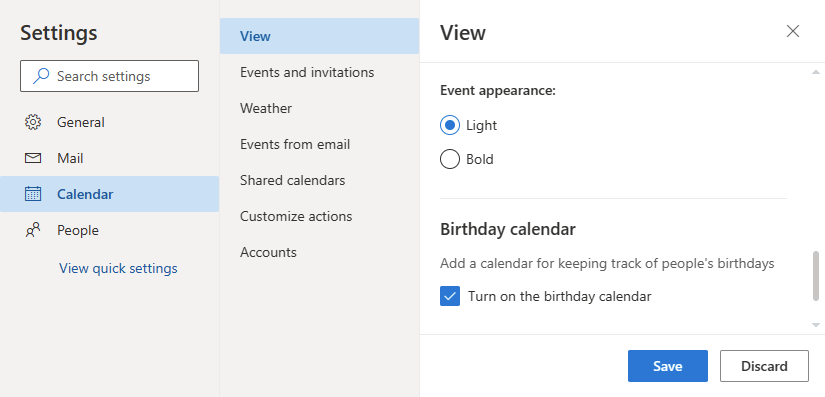
In the Settings dialog, select Calendar and scroll all the way to the bottom of the View section to see the “Turn on the birthday calendar” option and press Save.
You can also try the following direct links for the Birthday Calendar option in Microsoft 365 Exchange Online or the Birthday Calendar option in Outlook.com.
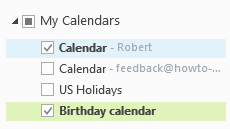
After you create the Birthday Calendar, it will automatically get added to Outlook on the desktop again after a few minutes or once you restart Outlook.
Exchange 2016 / 2019
 When you are using an Exchange 2016 / 2019 mailbox, then you can use the following directions.
Logon on to the website of your Outlook on the Web (OWA) mailbox provided by your company.
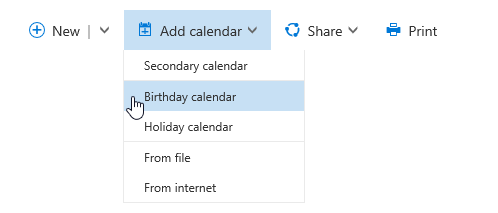
Once logged on, select your Calendar, press the “Add calendar” button at the top and choose: Birthday calendar.