
AutoComplete not working as expected in Outlook
When I'm typing an address in the To field, Outlook doesn't offer some of the addresses of my contacts.
How can I enable autocomplete for all my contacts?
 Outlook’s AutoComplete feature doesn’t always work as expected. In most cases, it only suggests names and addresses of people that you have emailed before.
An exception to this is when you are using Outlook for Microsoft 365 with an Exchange Online or Outlook.com account. In that case you (most often) also get suggestions of people within your Contacts folder, your Global Address List (GAL) and people you have recently communicated with via Teams.
Luckily, Outlook also have a “fallback” feature called “Check Names”.
What is the difference between AutoComplete and Check Names?
 Outlook’s AutoComplete feature makes query based suggestions from the following lists;
- People you have emailed before (last 1000).
- With Outlook for Microsoft 365;
- Contacts folder (Exchange Online and Outlook.com only).
- Recent communications in Teams (Exchange Online only).
- Global Address List (Exchange Online only).
From the results, AutoComplete will show up to 5 names and addresses.
Any people that you have been in contact with will have priority and be shown under “Recent People”. If there are less than 5 “Recent People” suggestions, it will try to fill the remaining spots with “Other Suggestions”.
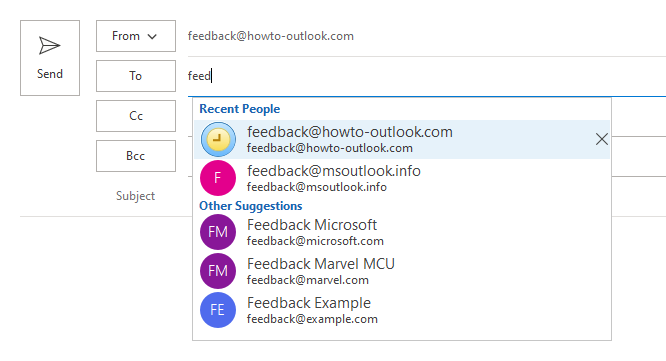
AutoComplete with Recent People and Other Suggestions.
When you are not using an Exchange Online or Outlook.com account, the AutoSuggest feature doesn’t have a direct relation to your Contacts folder or other address lists configured in your Address Book.
Instead, AutoSuggest will only rely on the cache which contains a list of addresses that you’ve previously used. For more about cleaning up your AutoSuggest cache list, see this previous tip.
The Check Names feature of Outlook does have direct relation to your Contacts folder and any other Address Lists in your Address Book.
It will either auto-resolve addresses and names automatically in the background or you can trigger it manually and interact with it if needed.
Check Names – Interactive
 To use Check Names interactively, you type part of the name or address and then press the Check Names button on the Ribbon or press its keyboard shortcut (for most localized versions this is CTRL+K).
Check Names will search in your Address Book for that part of the name or address.
If only a single address is resolved, it will directly show this in the To-field (or Cc or Bcc field).
If multiple addresses are found, then it will prompt you with a dialog, containing the contacts it found, from which you can select the correct address.
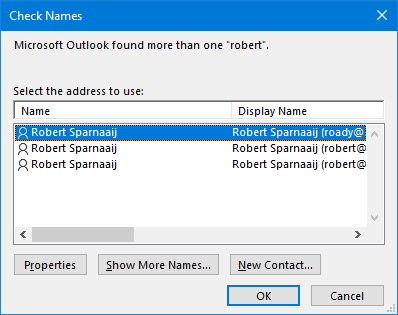
Check Names dialog with all results found.
Check Names – Background process
 When you only type part of a name or address and then switch to the message body, Check Names will perform a background search in your Address Book.
If only a single address is resolved, it will autocomplete the address for you.
If multiple addresses are found, it will underline the address with a red scribble line.
When you press the Send button while an address is not fully resolved (not underlined), you’ll get prompted to select the correct address similar to the interactive method.
To turn of this background feature of Check Names go to;
- File-> Options…-> Mail –> section: Send messages-> uncheck: Automatic name checking
