
Sending mail rejected and returned
When I send a message, I get it returned with a message from System Administror;
550 #5.1.0 Address rejected
553 Sorry, that domain isn't in my list of allowed rcpthosts
Relaying prohibited
How do I fix this?
 You get this error when the outgoing server (SMTP) does not recognize you as an authorized user.
This can happen for various reasons but in general you'll encounter this when you want to send a message through an SMTP server that is on another network than you are currently connected to. For instance when you want to send an email on your laptop from your hotel room via the network of the hotel.
Enable authentication for your SMTP server
When this happens, you can configure your outgoing server to use authentication before sending this message. You can do this in your account settings.
Outlook 2016, Outlook 2019, Outlook 2021, and Microsoft 365
- File-> Account Settings-> Account Settings…
- Select your mail account.
- Press the button Repair…
- Dropdown link: Advanced options-> select: Let me repair my account manually
- Button: Repair
- Outgoing mail-> select: My outgoing server (SMTP) requires authentication
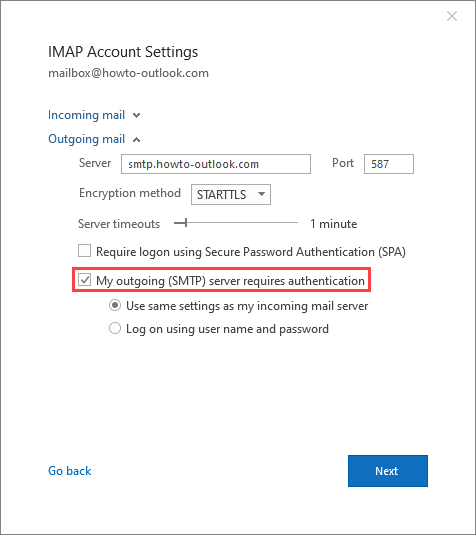
Enable authentication for your SMTP server.
Outlook 2010, Outlook 2013 and Outlook 2016 (MSI)
- File-> Account Settings-> Account Settings…
- Select your mail account.
- Press the button Change…
- Press the button More Settings…
- Select: tab Outgoing Server.
- Select: My outgoing server (SMTP) requires authentication
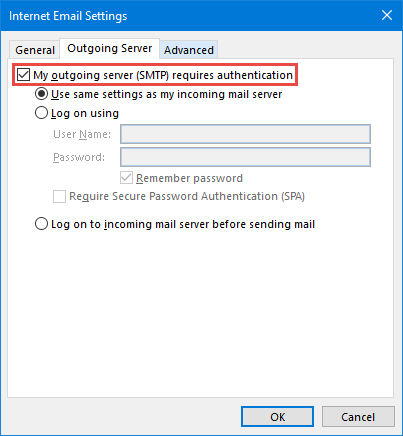
Enable authentication for your SMTP server.
Note: Some ISPs have configured their SMTP servers to never allow sending messages from another network. In this case you have to use the web mail provided by your ISP instead.
In theory, you could also ask the administrator of the network you are connected to (in our example that would be the administrator of the hotel network) for their SMTP server settings but then there is a high likelihood that your message will be dropped as spam due to measurements such as SPF-records for your domain.
