
Blue arrow icon on folders
What does the blue arrow icon pointing left and right on a folder mean?
This blue double-ended or 2-way arrow icon means that the folder is part of a shared source you are connected to and thus not part of your own mailbox. A shared source could be a mailbox belonging to someone else, a Public Folder, an Internet Calendar or a SharePoint library.
This overlay icon has been introduced in Outlook 2007 and is also used in Outlook 2010. It’s only a visual aid and doesn’t for instance indicate whether or not the folder is cached. Whether or not a shared folder can be cached depends on the type of shared folder and your version of Outlook.
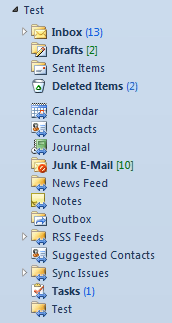
Blue arrows on folders icons in a shared mailbox.
Note 1: The blue arrow icon isn’t shown on default mail folders which already hold an overlay icon of their own such as the Inbox, Sent Items and Junk E-mail folder.
Note 2: For an overview of the meaning of all folder and item icons see; What do the icons mean?
