
Which Exchange version am I using?
I've read about several features I liked but they depend on the version of Exchange I am connecting to.
Aside from contacting my mail admin, how can I found out which version of Exchange I'm running against?
 There is an option to check your connection status which also displays the Exchange version number.
- Start Outlook and connect to the Exchange server if this isn’t done automatically already.
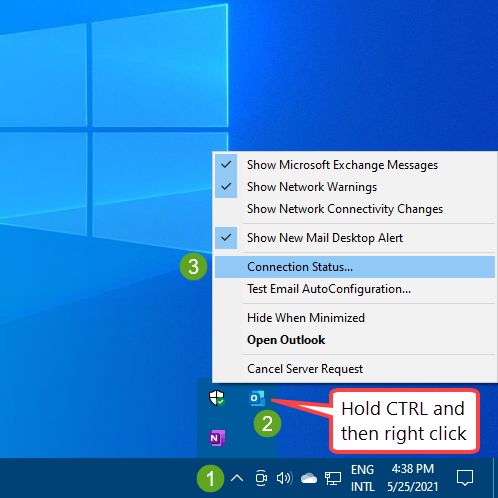
- Hold CTRL while clicking on the Outlook icon in the Notification Area
(located in the right bottom area near the time; expand the Notification Area first if the Outlook icon does not show). From the context menu that pops-up choose: Connection Status…
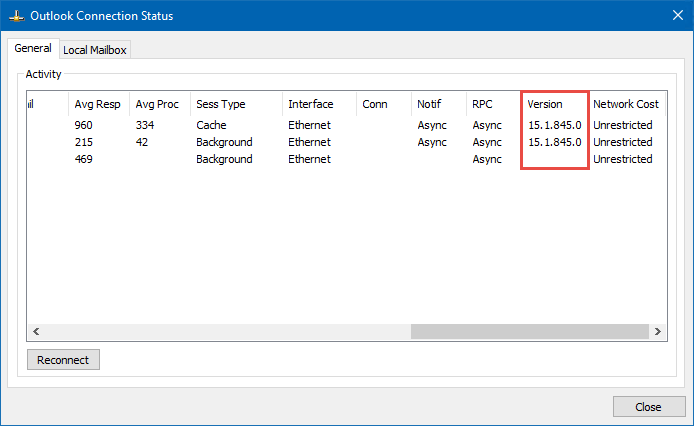
- Scroll the horizontal scrollbar to the right to see the last column.
(if the dialog is empty, then you are not connected to Exchange) - Here you’ll see a version number. Use the table below to determine which named version of Exchange it corresponds with.
Your version number could be between 2 named versions. In that case, your named version corresponds with the lower version but with some additional update installed.
| Microsoft 365 Exchange Online and Outlook.com | 15.20.###.# |
| Microsoft Exchange Server 2019 | 15.2.221.12 |
| Microsoft Exchange Server 2019 CU1 | 15.2.330.5 |
| Microsoft Exchange Server 2019 CU2 | 15.2.397.3 |
| Microsoft Exchange Server 2019 CU3 | 15.2.464.5 |
| Microsoft Exchange Server 2019 CU4 | 15.2.529.5 |
| Microsoft Exchange Server 2019 CU5 | 15.2.595.3 |
| Microsoft Exchange Server 2019 CU6 | 15.2.659.4 |
| Microsoft Exchange Server 2019 CU7 | 15.2.721.2 |
| Microsoft Exchange Server 2019 CU8 | 15.2.792.3 |
| Microsoft Exchange Server 2019 CU9 | 15.2.858.5 |
| Microsoft Exchange Server 2019 CU10 | 15.2.922.7 |
| Microsoft Exchange Server 2019 CU11 | 15.2.986.5 |
| Microsoft Exchange Server 2019 CU12 | 15.2.1118.7 |
| Microsoft Exchange Server 2019 CU13 | 15.2.1258.12 |
| Microsoft Exchange Server 2016 | 15.1.225.42 |
| Microsoft Exchange Server 2016 CU1 | 15.1.396.30 |
| Microsoft Exchange Server 2016 CU2 | 15.1.466.34 |
| Microsoft Exchange Server 2016 CU3 | 15.1.544.27 |
| Microsoft Exchange Server 2016 CU4 | 15.1.669.32 |
| Microsoft Exchange Server 2016 CU5 | 15.1.845.34 |
| Microsoft Exchange Server 2016 CU6 | 15.1.1034.26 |
| Microsoft Exchange Server 2016 CU7 | 15.1.1261.35 |
| Microsoft Exchange Server 2016 CU8 | 15.1.1415.2 |
| Microsoft Exchange Server 2016 CU9 | 15.1.1466.3 |
| Microsoft Exchange Server 2016 CU10 | 15.1.1531.3 |
| Microsoft Exchange Server 2016 CU11 | 15.1.1591.10 |
| Microsoft Exchange Server 2016 CU12 | 15.1.1713.5 |
| Microsoft Exchange Server 2016 CU13 | 15.1.1779.2 |
| Microsoft Exchange Server 2016 CU14 | 15.1.1847.3 |
| Microsoft Exchange Server 2016 CU15 | 15.1.1913.5 |
| Microsoft Exchange Server 2016 CU16 | 15.1.1979.3 |
| Microsoft Exchange Server 2016 CU17 | 15.1.2044.4 |
| Microsoft Exchange Server 2016 CU18 | 15.1.2106.2 |
| Microsoft Exchange Server 2016 CU19 | 15.1.2176.2 |
| Microsoft Exchange Server 2016 CU20 | 15.1.2242.4 |
| Microsoft Exchange Server 2016 CU21 | 15.1.2308.8 |
| Microsoft Exchange Server 2016 CU22 | 15.1.2375.7 |
| Microsoft Exchange Server 2016 CU23 | 15.1.2507.6 |
| Microsoft Exchange Server 2013 | 15.0.516.32 |
| Microsoft Exchange Server 2013 CU1 | 15.0.620.29 |
| Microsoft Exchange Server 2013 CU3 | 15.0.712.24 |
| Microsoft Exchange Server 2013 CU3 | 15.0.775.38 |
| Microsoft Exchange Server 2013 SP1 (CU4) | 15.0.847.32 |
| Microsoft Exchange Server 2013 CU5 | 15.0.913.22 |
| Microsoft Exchange Server 2013 CU6 | 15.0.995.29 |
| Microsoft Exchange Server 2013 CU7 | 15.0.1044.25 |
| Microsoft Exchange Server 2013 CU8 | 15.0.1076.9 |
| Microsoft Exchange Server 2013 CU9 | 15.0.1104.5 |
| Microsoft Exchange Server 2013 CU10 | 15.0.1130.7 |
| Microsoft Exchange Server 2013 CU11 | 15.0.1156.6 |
| Microsoft Exchange Server 2013 CU12 | 15.0.1178.4 |
| Microsoft Exchange Server 2013 CU13 | 15.0.1210.3 |
| Microsoft Exchange Server 2013 CU14 | 15.0.1236.3 |
| Microsoft Exchange Server 2013 CU15 | 15.0.1263.5 |
| Microsoft Exchange Server 2013 CU16 | 15.0.1293.2 |
| Microsoft Exchange Server 2013 CU17 | 15.0.1320.4 |
| Microsoft Exchange Server 2013 CU18 | 15.0.1347.2 |
| Microsoft Exchange Server 2013 CU19 | 15.0.1365.1 |
| Microsoft Exchange Server 2013 CU20 | 15.0.1367.3 |
| Microsoft Exchange Server 2013 CU21 | 15.0.1395.4 |
| Microsoft Exchange Server 2013 CU22 | 15.0.1473.3 |
| Microsoft Exchange Server 2013 CU23 | 15.0.1497.2 |
| Microsoft Exchange Server 2010 | 14.0.639.21 |
| Microsoft Exchange Server 2010 SP1 | 14.1.218.15 |
| Microsoft Exchange Server 2010 SP2 | 14.2.247.5 |
| Microsoft Exchange Server 2010 SP2 RU4 | 14.2.318.2 |
| Microsoft Exchange Server 2010 SP3 | 14.3.123.4 |
| Microsoft Exchange Server 2010 SP3 RU11 | 14.3.266.1 |
| Microsoft Exchange Server 2010 SP3 RU12 | 14.3.279.2 |
| Microsoft Exchange Server 2010 SP3 RU13 | 14.3.294.0 |
| Microsoft Exchange Server 2010 SP3 RU14 | 14.3.301.0 |
| Microsoft Exchange Server 2010 SP3 RU15 | 14.3.319.2 |
| Microsoft Exchange Server 2010 SP3 RU16 | 14.3.339.0 |
| Microsoft Exchange Server 2010 SP3 RU17 | 14.3.352.0 |
| Microsoft Exchange Server 2010 SP3 RU18 | 14.3.361.1 |
| Microsoft Exchange Server 2010 SP3 RU19 | 14.3.382.0 |
| Microsoft Exchange Server 2010 SP3 RU20 | 14.3.389.1 |
| Microsoft Exchange Server 2010 SP3 RU21 | 14.3.399.2 |
| Microsoft Exchange Server 2010 SP3 RU22 | 14.3.411.0 |
| Microsoft Exchange Server 2010 SP3 RU23 | 14.3.417.1 |
| Microsoft Exchange Server 2010 SP3 RU24 | 14.3.419.0 |
| Microsoft Exchange Server 2010 SP3 RU25 | 14.3.435.0 |
| Microsoft Exchange Server 2010 SP3 RU26 | 14.3.442.0 |
| Microsoft Exchange Server 2010 SP3 RU27 | 14.3.452.0 |
| Microsoft Exchange Server 2010 SP3 RU28 | 14.3.461.1 |
| Microsoft Exchange Server 2010 SP3 RU29 | 14.3.468.0 |
| Microsoft Exchange Server 2010 SP3 RU30 | 14.3.496.0 |
| Microsoft Exchange Server 2010 SP3 RU31 | 14.3.509.0 |
| Microsoft Exchange Server 2010 SP3 RU32 | 14.3.513.0 |
| Microsoft Exchange Server 2007 | 8.0.685.24 |
| Microsoft Exchange Server 2007 SP1 | 8.1.240.6 |
| Microsoft Exchange Server 2007 SP2 | 8.2.176.0 |
| Microsoft Exchange Server 2007 SP3 | 8.3.83.0 |
| Microsoft Exchange Server 2007 SP3 RU23 | 8.3.517.0 |
| Microsoft Exchange Server 2003 | 6.5.6944 |
| Microsoft Exchange Server 2003 SP1 | 6.5.7226 |
| Microsoft Exchange Server 2003 SP2 | 6.5.7638 |
| Microsoft Exchange Server 2000 | 6.0.4417 |
| Microsoft Exchange Server 2000 SP1 | 6.0.4712 |
| Microsoft Exchange Server 2000 SP2 | 6.0.5762 |
| Microsoft Exchange Server 2000 SP3 | 6.0.6249 |
Note: For an overview of the Outlook version numbers see the post: Outlook versions and trivia.
