
Cannot open the Outlook window error
When trying to start Outlook, I get the following error;
"Cannot start Microsoft Outlook. Cannot open the Outlook window."
How can I recover and start Outlook again?
While there are various reasons for this to occur, some post Office 2007 Service Pack 2 updates seems to cause this error for certain configurations but it can also occur in Outlook 2003, Outlook 2010 and Outlook 2013.
In these instances, the configuration file for the Navigation Pane gets corrupted and prevents Outlook from starting successfully.
To recover, you can start Outlook with the resetnavpane switch;
- Windows Vista, Windows 7 and Windows 8
Start-> type;outlook.exe /resetnavpane - Windows XP
Start-> Run;outlook.exe /resetnavpane
Please note the space between outlook.exe and /resetnavpane.
While the above method currently applies to most cases where this issue is experienced, as mentioned earlier, there could be other causes for this to happen as well.
If you are still experiencing the issue after applying this fix you can try these troubleshooting steps or post in the Outlook forums.
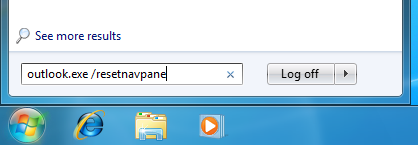
Executing the resetnavpane switch for Outlook on Windows 7
