
Backward Looking P’s (¶) in Message
When I create a new message or when I click Reply to reply back to an exisitng email, I've got backward looking P's (¶) all over my reply email and another one where I start typing in a new email.
How do I remove these?
These are Pilcrow characters to indicate carriage returns (when you pressed the Enter key on your keyboard). You’ll probably also see dots between your words to indicate spaces.
Press CTRL+SHIFT+8 to toggle the “Show markup” feature on/off.
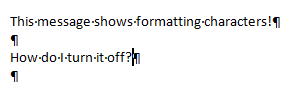
Message with formatting characters.
Note: These characters do not show up at the receiving end or when printing the message.
