
Moving or Copying Calendar Items
I am able to easily move all my Mail and Contacts to a new folder but how can I do the same for my Calendar Appointments and Meetings?
 The Day/Week/Month view of the Calendar folder indeed makes it impossible to move or copy all your Calendar items at once.
By switching your Calendar view to a List view, you can move your Calendar items in the same way as that you do for your emails like for instance Drag & Drop, the Move command in the Ribbon or the right click menu (which both also hold the “Copy to folder” command) or the CTRL+A/C/X/V keyboard shortcuts.
- Outlook 2007
View-> Current View-> All Appointments - Outlook 2010 / 2013 / 2016 / 2019 / 2021 / Microsoft 365
View-> Change View-> List
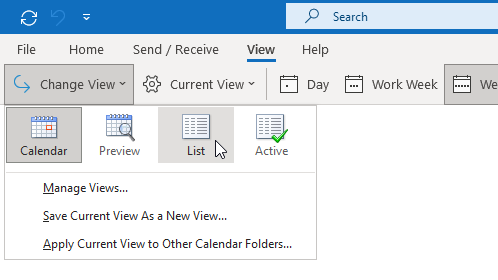
Changing your Calendar view to the List view makes moving your items much easier.
