
Missing categories when transferring to Outlook on a new computer
I got a new PC with Outlook 365 on it. I copied the pst-file from my old computer running an older version of Outlook to the new one but now I'm missing all my Categories in Outlook.
How do I get them to into Outlook 365?
 Actually, your categories are still there. Starting with Outlook 2007, the Master Category List is stored within the mailbox (pst-file, ost-file or Exchange mailbox) as opposed to previous versions of Outlook which stored them in the Registry.
If you are coming from Outlook 2003 or previous or when you have imported your pst-file rather than reconnected it to Outlook or reconfigured it with you account, then Outlook will need to rebuild the Master Category list.
Build the Master Category List
To build the new Category list in Outlook, right click on the top of the mailbox and choose Properties. Here you’ll see a button called “Upgrade to Color Categories…”.
When you press this button, Outlook will look through the entire mailbox for Categories and when found, it will add them to the Master Category List.
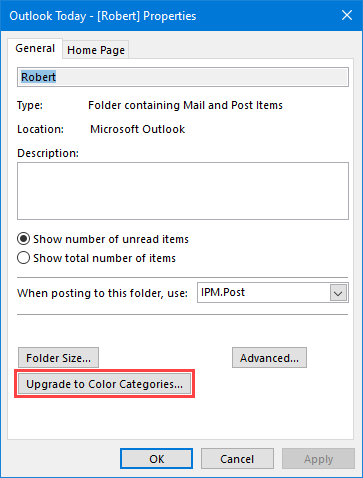
Build the Master Category List by using the Upgrade to Color Categories button if Outlook didn’t do it automatically.
Command line alternative
You can also start Outlook with the /remigratecategories switch to achieve the same result;
- Start-> type:
outlook.exe /remigratecategories
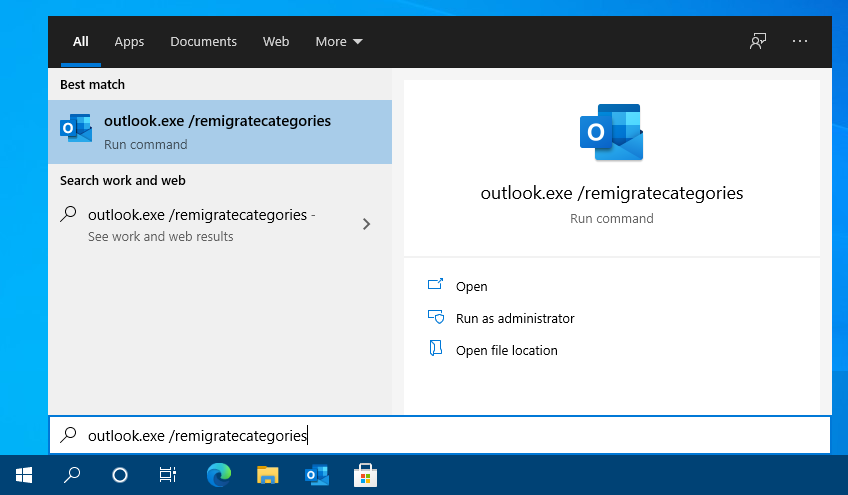
Starting Outlook with the remigratecategories switch.
(note the space in the command above)
Note: For a list of other command line switches for Outlook see the guide; How to use command line switches
