
Select next unread message automatically
When I return after some free days, I handle all my unread mail starting at the bottom (as it is the message that I received first after I went away).
When I'm done with the email, I usually either delete it or move it to another folder. After this, Outlook automatically selects the email before it; which I've already read.
Can I make Outlook to move up the list of message and thus automatically select my next unread item instead of going down the list of received messages?
 There is an option in Outlook to determine which email gets selected after you move or delete the currently selected or open item.
You can combine this with other settings to make sure that it automatically selects the next unread email.
After moving or deleting an open item
 To control which message get selected after moving or deleting the current message, you can set the following option:
- Outlook 2007
Tools-> Options…-> button E-mail Options…-> option: After moving or deleting an open item: open the previous item - Outlook 2010 / 2013 / 2016 / 2019 / Office 365
File-> Options-> section Mail-> option group: Other-> option: After moving or deleting an open item: open the previous item
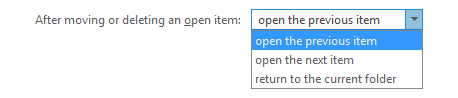
Control which message gets selected after moving or deleting the
current message.
Use the “Unread Mail” Search Folder or “Unread Messages Only” view
 If you really want to focus on only your unread messages, you can set your view to “Unread Messages Only” or use/create the “Unread Mail” Search Folder.
This will filter out all your read messages so you will automatically go to the next unread message. You can change your sorting order by pressing the “Received” column.
Option 1: Switch to the Unread Messages view
 To switch your view to the Unread Messages in This Folder view use;
- Outlook 2007 and Outlook 2010
View-> Current View-> Unread Messages in This Folder - Outlook 2013 and Outlook 2016
Under the Search field above your message list, click on “Unread”. - Outlook 2019 and Office 365
- With Focuses Inbox enabled;
Click on “By Date” at the top right of your message lists and from the dropdown choose; Unread Mail - With Focused Inbox disabled or within other folders;
At the top of your message list, click on “Unread”.
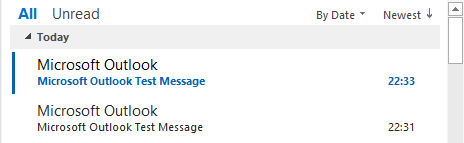
There is a quick All/Unread filter listed above your Message List.
Option 2: Creating the Unread Mail Search Folder
 To create the Unread Mail Search Folder use the keyboard shortcut CTRL+SHIFT+P or;
- All Outlook versions
Right click on “Search Folders” in the Folder List and choose; New Search Folder… - Outlook 2007
File-> New-> Search Folder… - Outlook 2010 / 2013 / 2016 / 2019 / Office 365 (Classic Ribbon)
Folder-> New Search Folder
In the New Search Folder dialog, select “Unread mail” and then press OK.
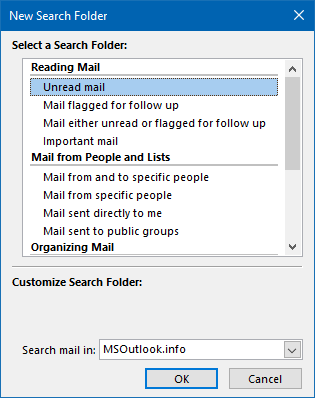
Creating an Unread Mail Search Folder to quickly catch up
with newly received mail.
