
Contact sorting order in Address Book
I've stored my contacts as First Last but when I address an email by pressing on the "To:" button, it still shows them Last, First.
How can I show them all as First Last like they have saved them in the Contacts folder?
 The display order of the Address Book (which shows up when pressing the “To:” button) can be controlled separately from how your contacts are stored in the Contacts folder. It will require an additional change to your Address Book settings to change the display of the names to First Last.
The option to change the sorting of the Address Book is a bit hidden though;
- Outlook 2007
Tools-> Account Settings…-> tab Address Books-> select: Outlook Address Book-> button Change… - Outlook 2010 / 2013 / 2016 / 2019 / Office 365
File-> Info-> Account Settings-> Account Settings…-> tab Address Books-> select: Outlook Address Book-> button Change…
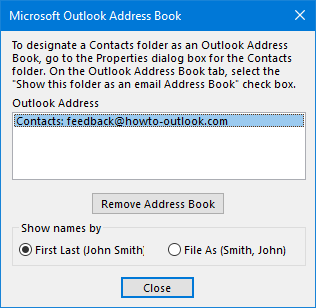
Changing the sorting order of the Address Book.
File As
The “File As (Last, First)” sorts the Address Book based on the “File As” field for that given contact. While the default is “Last, First”, you can change this in Outlook via;
- Outlook 2007
Tools-> Options…-> button Contact Options… - Outlook 2010 / 2013 / 2016 / 2019 / Office 365
File-> Options-> section Contacts
You can also modify the “File As” field on a per contact basis by simply editing the “File As” field of that specific contact by opening the contact from your Contacts folder.
Note: This option will not affect any existing contacts; it will only change it for newly created contacts. If you want to update the “File As” field for all your contacts to match the newly specified format, it is done easiest via an add-in such as Contacts Sort Order by Sperry Software (discount code: BH93RF24) or ChangeNames from Outlook-Stuff. You can also do it via a VBA macro.
