Highlight Today in the Calendar
When I use the monthly calendar view in Outlook, I have trouble determining which day is today.
How can I make it strike more?
 Even though Outlook already highlights Today in the Monthly Calendar, I have to admit; I have trouble seeing it as well.
This is probably due to the fact that I’m color blind and a lot of color coding in Outlook is done via tinted colors, shades or glares (or whatever you like to call it).
But even when you are not color blind, the highlighting is easily overlooked.
Differences in highlighting throughout the Outlook versions
Outlook 2002/XP and previous don’t show any highlighting at all.
Outlook 2003 only shows a yellow/orange/red shaded header on today’s date.
Outlook 2007 improved a bit on this to also place a colored border around today’s date.
In Outlook 2010, the highlighting was improved again and also shades the entire day that is “Today”. With the right Calendar background color (see below), this is actually quite workable.
In Outlook 2013, for some reason, they removed this shading of the entire day again and now only a slightly thicker border line at the top of today’s date remains (oh, and the date number itself). To me, this is a step backwards.
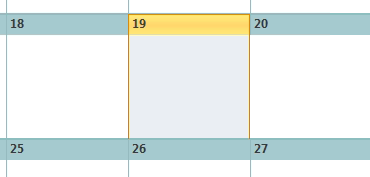
Do you think they finally got it right in Outlook 2010?
Oh bother… they removed it again in Outlook 2013…
Change calendar background color to increase the contrast
 My personal solution to make the highlighting strike a bit more in Outlook is to use a background color that works a bit better for you to see the highlighting. To change the background color of your calendar go to;
- Outlook 2003 and Outlook 2007
Tools-> Options…-> button Calendar Options… - Outlook 2010 and Outlook 2013
File-> Options-> section Calendar-> option group: Default calendar color
(or set it via the Color option on the View tab when your calendar is selected)
In Outlook 2010, the second color in the second line works best for me which corresponds with the 5th color from the top in Outlook 2007. In Outlook 2003 it is the 6th color that does the trick. In Outlook 2013, none of the colors really work for me and I usually resort to the “Today” button when I’m lost (see further below).
Play around with it until you have found your best color.
Multiple Calendars
When you are using multiple Calendars, you might want to enable the option “Use selected color on all calendars” as well.
Otherwise Outlook will select a different color for each Calendar that you open side-by-side or uses its internal default (the first color in the dropdown list) when you look at a different calendar than your default.
Jump to Today
 Sadly, in Outlook 2002/XP and previous, the background color solution will not work as Outlook will not apply calendar backgrounds to the Monthly Calendar.
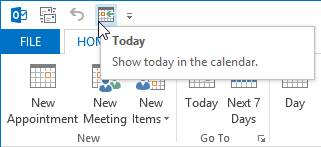
A thing which might help (and also works for al other Outlook versions) is to press the Today button on the Toolbar or use your localized ALT+key shortcut (by default ALT+O for the English version of Outlook).
This will make the selection color “jump” to today’s date which you probably will notice and can recognize where it is located in the Calendar.
In Outlook 2010 and Outlook 2013, you’ll find this keyboard shortcut no longer works. The official keyboard sequence is now: ALT, H, O, D
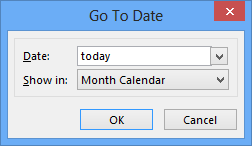
As this is a bit unintuitive, you might want to remember CTRL+G instead or press on the  icon in the bottom right of the Go To group. This brings up the “Go To Date” dialog where you can simply type “today” rather than a date. Things like “Christmas” and “3 days before Thanksgiving” work as well.
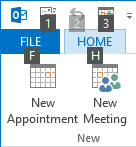
Yet another solution would be to right click on the Today button and choose: Add to Quick Access Toolbar. You can then press ALT followed by the number that is displayed on the icon. In the example below, that would be: ALT, 3