
I’m getting some weird graphics anomalies with my screen when using Outlook.
For instance, the screen suddenly turns completely black or white, and when I move over those spaces with my mouse, the Outlook UI starts to appear again but only in those places.
At other times, text in the Ribbon and Folder Pane overlap or folders appear empty even when they are not.
Restarting Outlook fixes it temporarily but I’d like to fix it permanently.
I was recommended to “disable hardware graphics acceleration” but I can’t find that option anywhere.
How do I solve this issue?
► Continue to the answer

I’ve heard about Quick Steps before and see them on the Ribbon in Outlook but I’ve never used them before.
What exactly are Quick Steps and how can they help me with managing my emails?
► Continue to the answer

We need to make some changes in Outlook which requires administrator permissions.
I logged on as the administrator of the computer, but I still can’t perform the action and make the required changes.
How can I start Outlook as an Administrator on Windows 11?
► Continue to the answer

Now that Windows 11 is available, I’m trying to figure out whether it is safe for me to upgrade to it.
Which versions of Outlook are supported on Windows 11?
► Continue to the answer

Choosing to view a message in a web browser used to open Internet Explorer and display it as a mht-file with all formatting and pictures.
Now when I choose this option, it opens Microsoft Edge but only shows the HTML code of the message and doesn’t actually render the message itself.
With Microsoft (and me) moving away from Internet Explorer, and removing it from Windows 11, how can I properly open the emails in Microsoft Edge or another web browser?
Or is Microsoft going to improve the rendering capabilities in Outlook for HTML emails?
► Continue to the answer

We receive S/MIME encrypted emails which we need to store in a financial or HR database system that is encrypted and protected otherwise itself as well.
As we save the original message, they remain encrypted and can only be opened by the original recipient that has the S/MIME certificate.
Trying to open these messages from the application gives the error;
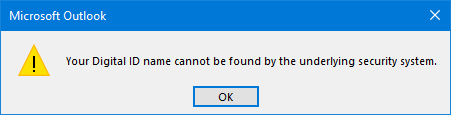
Is there a way to remove the S/MIME encryption from a message and save it unencrypted?
► Continue to the answer

When adding attendees to my meeting invitation, for some of the attendees, their free/busy status shows as “No Information” in the Scheduling Assistant.
Why is this and how can I make Outlook retrieve this information again for this attendee?
► Continue to the answer

How do I add a WhatsApp link to my email signature so that people can also message or call me directly on WhatsApp instead of replying by email?
► Continue to the answer

I’m using the Office Insider Beta version for Microsoft 365 and just got switched to the new look of Outlook 365.
However, within Outlook, it is no longer showing the Quick Access Toolbar and within Word, it is showing the Quick Access Toolbar below the Ribbon.
How can I reenable the Quick Access Toolbar in the new Outlook for Microsoft 365 and make it show above the Ribbon and within the Title Bar again?
► Continue to the answer


